

產品系列
幾十余種工業儀表規格
準現貨交付
引導工藝革新13年
源自我們只做儀表
四全服務體系
聯測產品符合行業服務標準
產品展示
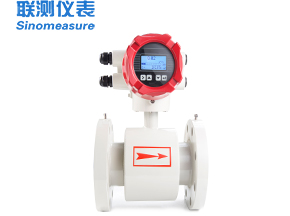
流量儀表
十余年來,聯測儀表秉承“敢于創新,誠信經營”的企業精神,自主生產的流量儀表目前有電磁流量計、渦輪流量計、渦街流量計、超聲波流量計
等過程自動化流量儀表。公司產品廣泛應用于電力、石油、化工、食品、機械制造等眾多領域。
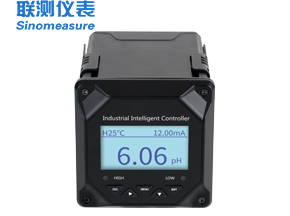
水質儀表
聯測儀表pH控制器廣泛應用于印染行業、污水處理行業、脫硫脫硝行業、控制加藥等場合。
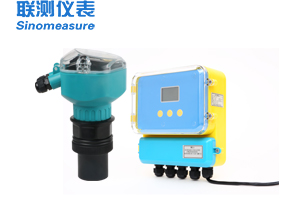
記錄儀表
聯測儀表無紙記錄儀廣泛應用于水處理行業、電力行業、造紙行業、食品行業、冶金行業等場合。
行業案例
客戶覆蓋全球各個行業
近10余年來
累計超過12850個客戶案例
-
印染行業案例印染工業污水水質一般隨采用的纖維種類和加工、印染工藝的不同而變化幅度較大。 由于現代織物上越來越多地使用化學漿料(PVA)、化纖織物加工和整理越來越多的采用堿減量法處理技術, 因此形成了較難處理的堿減量—印染混合污水。
-
常州東方諾亞印染有限公司
常州東方諾亞印染有限公司位于江蘇常州市,主要經營印染產品和植絨產品等產品。常州東方諾亞印染有限公司在印染污水處理過程中 均采用我司的電磁流量計 ,用于對污水流量進行監測。
-
浙江大拓印染有限公司
浙江大拓印染有限公司位于浙江紹興市,主要經營紡織品染色、整理、印染;生產、加工、經銷:針紡織品等。 此次廠內的印染污水處理以及廢氣處理均采用我司ph計,效果良好,并與環保局聯網,實時公示并上傳數據。
-
襄陽信正紡織有限公司
襄陽信正紡織有限公司位于浙江襄陽市,主要經營紡織服裝 紡織印染等。 此次廠內的印染污水處理以及壓縮空氣計量均采用我司街流量計、電磁流量計、液位傳感器、壓力傳感器以及溫度傳感器, 用于實現實時監測流量數據、精準監控各項能耗的功能
-
-
水處理行業案例『廢水處理』污水監測系統正逐步向高速化,自動化、智能化的方向發展。聯測致力于為客戶提供專業水計量系統。目前自主生產制造的電磁流量計 、壓力變送器、在線pH計等儀表廣泛應用于水處理行業。
-
湖南金旅環保股份有限公司
湖南金旅環保股份有限公司主要是做水環境處理、土壤環境處理等環境處理, 此次選用聯測電磁流量計,用于污水流量測量。通過485通訊,將流量數據聯網,遠程監控顯示,達到環保物聯網要求。
-
鷺濱環保科技(上海)股份有限公司
鷺濱環保科技(上海)股份有限公司主要是做污泥處理項目、滲濾液項目等項目, 此次選用聯測電磁流量計,用于污水流量測量。通過485通訊,將流量數據聯網,遠程監控顯示,達到環保物聯網要求。。
-
清華大學
聯測電磁流量計用于清華大學等眾多科研項目測量清水、循環水、農業灌溉用水等流量的監測。
-
-
食品加工案例食品加工企業中需要監測污水流量、蒸汽流量、壓力、溫度等參數。聯測自主生產制造的電磁流量計、蒸汽流量計、壓力變送器、溫度傳感器 以及流量積算儀等儀表廣泛應用于食品加工行業。
-
浙江五芳齋實業股份有限公司
浙江五芳齋實業股份有限公司位于浙江嘉興,是一家以食品產業為核心的企業。 此次合作主要是采用GPRS遠傳技術,實現蒸汽各項數據的無線遠傳及電腦終端的上位機監測。 保證了在生產工藝中的環節控制問題及數據傳輸的正常進行通過GPRS無線遠傳蒸汽流量計流量,壓力,溫度。
-
福建安井食品股份有限公司
知名食品品牌“安井食品”,應用聯測的渦街流量計,測量蒸汽用量。公司是做產品包括紅糖饅頭、包子等冷凍食品, 是國內最大的食品企業之一,目前兩套渦街流量計現場運行正常,后面全廠區會全部換成聯測的流量計。
-
廣州廣味源食品有限公司
廣州廣味源食品有限公司位于廣東廣州,公司主營調味品、醬油、蠔油 、調味汁、調味醬等調味料產品, 此次聯測的電磁流量計、溶氧儀主要應用于米醋、辣椒醬、生抽生產過程污廢水排放處理效果的監測。
-
-
脫硫脫硝行業案例脫硫系統主要由煙氣系統、吸收氧化系統、石灰石/石灰漿液制備系統、副產品處理系統、廢水處理系統、 公用系統(工藝水、壓縮空氣、事故漿液罐系統等)、電氣控制系統等幾部分組成。
-
安陽睿鑫環保有限公司
安陽睿鑫環保有限公司位于河南安陽縣,公司主要經營環境保護專用設備的研發、銷售、安裝;脫硫、除塵、脫白 、脫硝的工程設計等環保工藝,此次主要合作pH電極主要應用于脫硫漿液、石灰漿液循環池。
-
襄陽賽歐環保設備有限公司
襄陽賽歐環保設備有限公司位于湖北襄陽,公司主要經營高壓電捕焦油器,電收塵,袋式除塵器,化工專用設備, 氣體、液體分離及純凈設備、節能電器產品生產等,此次主要合作工業在線ph計主要應用于測量脫硫液,采用石膏法脫硫。
-
.png)
.png)
.png)

.jpg)
.jpg)
.jpg)
.png)
.png)
服務支持
-
快速專業響應
無論是電話或在線咨詢,
儀表選型指導
我們會及時給予專業的答疑指導,
我們為您提供專業的解決方案。7*24小時咨詢熱線: 18767163200 -
量身定制
深入了解您的每一個需求,
立即免費獲取設計方案
為您提供適合全套的方案設計和儀表配置,
致力于提升您的儀表運營效益。 -
無憂售后
聯測服務網點遍布全球,國內2小時內駐地服務人員
到達客戶現場。以全過程、全身心、全天候、全方位
的四全服務標準,為您排憂解難。
客戶聲音
新聞中心
瀏覽全部新聞

浙ICP備07001561號-24杭州聯測自動化技術有限公司